RSS Feed Add to Technorati Favorites

If you have any dificulties ... Search here by Google

A big offer to everyone who viewing this site at http://ex-mac.blogspot.com/
Google
 
Showing posts with label gmail. Show all posts

Blogging For Dollars

Blogging for dollars might sound like the latest game show or some new drinking game, but it's the latest craze to hit the Internet. Bloggers began blogging for a number of reasons, but as the blog movement has increased in popularity, they have found ways to monetize their blogs and are seeing their commitment pay off.

Whether a blogger's focus is to communicate with customers or just to have fun, they have begun looking at ways to earn revenue from their blogs. The most popular ways for bloggers to earn some added cash for their pet projects are:

1. ) Google Adsense in Blogs
Google AdSense allows webmasters to dynamically serve content-relevant advertisements in blogs. If the visitor clicks one of the AdSense ads served to the blog, the website owner is credited for the referral. Webmasters need only to insert a Google-generated java script into the blog or blog template. Google's spider parses the AdServing blog and serves ads that relate to the blog's content. Google uses a combination of keyword matching and context analysis to determine what ads should be served.

2. ) Affiliate Programs (Product Endorsements)
Affiliate Programs work when an affiliate web site receives income for generating sales, leads, or traffic to a merchant website. Generally, bloggers will mention or endorse specific products and if site visitors purchase the product, bloggers will receive a portion of the sale.

3. ) Product Promotion
Businesses use blogs to detail how specific features or product add-ons can increase functionality and save time. Content-rich product promotion will help with search engine placement.

4.) Banner Ads
While less popular than in the past, websites with high traffic levels can still earn decent revenue by selling banner space.

As the Internet evolves bloggers will continue to seek out ways to monetize their opinions and thoughts. Daily journals and online blogs have become more than just a communication means to many.


About the Author:
Sharon Housley manages marketing for the NotePage http://www.notepage.netand FeedForAll http://www.feedforall.comproduct lines. Other sites by Sharon can be found at http://www.softwaremarketingresource.com, and http://www.small-business-software.net
Read more ...

Google Web Toolkit Applications

Google Web Toolkit Applications


Accelerate and Simplify Ajax Development with Google Web Toolkit

Get the edge you need to deliver exceptional user experiences with Google™ Web Toolkit Applications, a guidebook that provides web developers with core information and instructions for creating rich web applications. Whether you’re a developer who needs to build a high-performance front end for Java, PHP, or Ruby applications, or to integrate with external web services, this resource from expert Google Web Toolkit (GWT) developer Ryan Dewsbury delivers the in-depth coverage you’ll need.


In this valuable book, insider Ryan Dewsbury provides instructions for using the robust tool set and gets you on your way to creating first-class web applications by providing a comprehensive overview of GWT technology. In addition, he shares his “in-the-trenches” insights on


* Building elegant and responsive user interfaces with Cascading Style Sheets and GWT’s Widgets and Panels

* Creating seamless user experiences through asynchronous communication with HTTP, REST, JSON/JSONP, and RPC Interoperating with web standards–such as XML, RSS, and Atom–and web services–such as Google Maps, Amazon Books, Yahoo! Search, Flickr, and Blogger

* Overcoming browser security restrictions, such as HTTP’s two-connection limit and the Same-Origin policy

* Accelerating development, using software engineering, code generation, internationalization, application patterns, and Java tools

* Deploying for optimal performance with resource compression and caching

* Building five non-trivial applications: a gadget application with a rich drag-and-drop interface, a multi-search application that makes requests to many search engines, a blog editor application for managing entries across multiple blogs, a web-based instant messenger, and a database manager for a traditional web page


This practical guide to GWT introduces you to the technology; provides techniques, tips, and examples; and puts you on the road to delivering top-notch user experiences for your web applications.

608 pages December 15, 2007 PDF 5 Mb


Download Here

Read more ...

Make your Gmail account to be a "vitural HardWare"


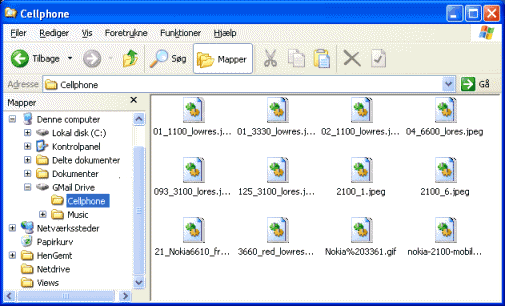
GMail Drive is a Shell Namespace Extension that creates a virtual filesystem around your Google Mail account, allowing you to use Gmail as a storage medium.
GMail Drive creates a virtual filesystem on top of your Google Gmail account and enables you to save and retrieve files stored on your Gmail account directly from inside Windows Explorer. GMail Drive literally adds a new drive to your computer under the My Computer folder, where you can create new folders, copy and drag'n'drop files to.
Ever since Google started to offer users a Gmail e-mail account, which includes storage space of 4000 megabytes, you have had plenty of storage space but not a lot to fill it up with. With GMail Drive you can easily copy files to your Google Mail account and retrieve them again. When you create a new file using GMail Drive, it generates an e-mail and posts it to your account. The e-mail appears in your normal Inbox folder, and the file is attached as an e-mail attachment. GMail Drive periodically checks your mail account (using the Gmail search function) to see if new files have arrived and to rebuild the directory structures. But basically GMail Drive acts as any other hard-drive installed on your computer. You can copy files to and from the GMail Drive folder simply by using drag'n'drop like you're used to with the normal Explorer folders.
Because the Gmail files will clutter up your Inbox folder, you may wish to create a filter in Gmail to automatically move the files (prefixed with the GMAILFS letters in the subject) to your archived mail folder.
Please note that GMail Drive is still an experimental tool. There's still a number of limitations of the file-system (such as total filename size must be less than 65 characters). Since the tool hooks up with the free Gmail Service provided by Google, changes in the Gmail system may break the tool's ability to function. I cannot guarantee that files stored in this manner will be accessible in the future.

Download this software here: http://www.megaupload.com/?d=CU21IBL1

Read more ...