RSS Feed Add to Technorati Favorites

If you have any dificulties ... Search here by Google

A big offer to everyone who viewing this site at http://ex-mac.blogspot.com/
Google
 
Showing posts with label tutorials. Show all posts

Hackings Book AIO


A Grate Collection of all the best Hacking Books all in one place

Download:

Megaupload

Rapidshare Read more ...

Fundamentals of Computer Science using Java


Author: David Hughes
Paperback: 525 pages
Publisher: Jones and Bartlett Publishers, Inc.; 1 edition (November 25, 2002)
Language: English
ISBN-10: 0763717614
ISBN-13: 978-0763717612
Format: pdf
Details:
Object-oriented languages in particular are useful in introductory textbooks and are certainly appropriate at this time. Having an object-oriented language as the core programming language supports many courses at the higher level (e.g., software engineering, user interfaces, databases). The question is, then, which object-oriented language?
Our decision to use Java was based on a number of factors. First, we recognized Java as a pure object-oriented language, as opposed to C++, which is a hybrid, and thus does not allow the programmer to fall back into procedural habits. Further, it has a relatively clear and common syntax that can be understood without having to learn a large class hierarchy. Finally, Java has compilers available on a great many platforms that are inexpensive, not overly resource hungry, and the code is platform-independent. All of these things make Java ideal for a first university course.


Megaupload

Rapidshare Read more ...

Advanced Photoshop Techniques


Download here
Read more ...

PHP 6 and MySQL 5 for Dynamic Web Sites: Visual QuickPro Guide

Open in new window


# Publisher: Peachpit Press (December 29, 2007)
# Language: English
# ISBN-10: 032152599X
# ISBN-13: 978-0321525994


Product Description
It hasn't taken Web developers long to discover that when it comes to creating dynamic, database-driven Web sites, MySQL and PHP provide a winning open source combination. Add this book to the mix, and there's no limit to the powerful, interactive Web sites that developers can create. With step-by-step instructions, complete scripts, and expert tips to guide readers, veteran author and database designer Larry Ullman gets right down to business: After grounding readers with separate discussions of first the scripting language (PHP) and then the database program (MySQL), he goes on to cover security, sessions and cookies, and using additional Web tools, with several sections devoted to creating sample applications. This guide is indispensable for intermediate- to advanced level Web designers who want to replace their static sites with something dynamic. In this edition, the bulk of the new material covers the latest versions of both technologies: PHP 6 (due out in 2008) and MySQL 5 (available now). The book's publication date is likely to beat the official release of PHP 6, making it one of the first books available on the subject.

From the Back Cover
When static HTML pages no longer cut it, you need to step up to dynamic, database-driven sites that represent the future of the Web. In PHP and MySQL for Dynamic Web Sites: Visual QuickPro Guide, the author of best-selling guides to both the database program (MySQL) and the scripting language (PHP) returns to cover the winning pair in tandem-the way users work with them today to build dynamic sites using Open Source tools. Using step-by-step instructions, clearly written scripts, and expert tips to ease the way, author Larry Ullman discusses PHP and MySQL separately before going on to cover security, sessions and cookies, and using additional Web tools, with several sections devoted to creating sample applications. A companion Web site includes source code and demonstrations of techniques used in the volume. If you're already at home with HTML, you'll find this volume the perfect launching pad to creating dynamic sites with PHP and MySQL. --This text refers to the Paperback edition.

Download here:
http://www.megaupload.com/?d=JU318KB3

or

http://rapidshare.com/files/130796575/6.and.5.rar
Read more ...

CBT Nuggets - Cisco CCSP - Exam-Pack 642-552: SND

Open in new window


Secure routing and switching. Firewalls. Intrusion prevention systems. Virtual private networking. Wireless security. The hacker mindset. A Cisco Certified Security Professional has to know them all. Securing Cisco Network Devices (SND) brings all these technologies together, teaching you how to use this knowledge to build a complete network security system.

The SND Series covers how you can:

* Choose the Cisco security devices you need for the protection and functionality you require.
* Implement the security devices to match your networking needs.
* Constantly refine your security through a network security cycle of securing, monitoring, testing, improving, and repeating.
* Create effective security policies – including gaining company backing, creating written guidelines for security, and more.
* Defend against attacks using CiscoÂ’s network security technologies.
* See where your network is vulnerable – discover your network faults before someone else does.
* Get up to date on recent Cisco security adjustments and changes to the SND exam

In addition to giving you practical, hands-on instruction, the training in Exam-Pack: 642-552 SND maps to exam objectives, preparing you for the simulation and knowledge-based SND exam requirements. Exam 642-552 SND is one of five exams required to earn the Cisco Certified Security Professional (CCSP) certification. It is also the core exam for the Cisco Firewall Specialist, Cisco IPS Specialist, and Cisco VPN Specialist certification programs.

A thorough understanding of Cisco networking such as a CCNA certification or equivalent knowledge is recommended before viewing these videos.

Cisco CCSP – Exam-Pack: 642-552 SND Contains:

- Security Introduction: Certification and Security Foundations
- Security Introduction: Attacks and Defense, Part 1 (free video!)
- Security Introduction: Attacks and Defense, Part 2
- Security Introduction: The Cisco Security Product Lineup
- Security Introduction: Self-Defending Networks
- Device Security: Locking Down the Cisco Router, Part 1
- Device Security: Locking Down the Cisco Router, Part 2
- Device Security: Locking Down the Cisco Router, Part 3
- Device Security: Configuring Cisco Routers for AAA
- Device Security: The Cisco ACS Server
- Device Security: Using Access Lists
- Device Security: Secure Management and Reporting
- Device Security: Locking Down the Catalyst Switch
- Device Security: Layer 2 Attacks
- Device Security: Additional Catalyst Security Features
- Security Appliances: PIX Firewall Foundations
- Security Appliances: PIX Firewall Basic Configurations, Part 1
- Security Appliances: PIX Firewall Basic Configurations, Part 2
- Security Appliances: IPS Foundations
- Security Appliances: IPS Basic IDM Configuration
- Security Appliances: Cisco Security Agent
- Virtual Private Networks: The Scoop Behind IPSec
- Virtual Private Networks: Cisco VPN Product Lineup
- Virtual Private Networks: VPN 3000 Concentrator Configuration
- Recent Cisco SND exam changes (free video!)
- Network Security Foundations Update
- Cisco Product Update
- Securing Wireless LANs Update
- Configuring the IOS Firewall with SDM Update
- Cisco MARS Update

All trademarks and copyrights are the property of their respective holders.

http://rapidshare.com/files/22713093/f-cncsnd.r00
http://rapidshare.com/files/22713314/f-cncsnd.r01
http://rapidshare.com/files/22713493/f-cncsnd.r02
http://rapidshare.com/files/22713351/f-cncsnd.r03
http://rapidshare.com/files/22713250/f-cncsnd.r04
http://rapidshare.com/files/22713291/f-cncsnd.r05
http://rapidshare.com/files/22713086/f-cncsnd.r06
http://rapidshare.com/files/22713083/f-cncsnd.r07
http://rapidshare.com/files/22713225/f-cncsnd.r08
http://rapidshare.com/files/22713142/f-cncsnd.r09
http://rapidshare.com/files/22713315/f-cncsnd.r10
http://rapidshare.com/files/22713340/f-cncsnd.r11
http://rapidshare.com/files/22713299/f-cncsnd.r12
http://rapidshare.com/files/22713335/f-cncsnd.r13
http://rapidshare.com/files/22713051/f-cncsnd.r14
http://rapidshare.com/files/22713136/f-cncsnd.rar
Read more ...

Total Training for Adobe Dreamweaver CS3(Training Vids 2DVD)


Discover the power of Dreamweaver, an award-winning Web design program with this in-depth tutorial. From the basics of how to create Web pages, set links, and insert images, to more advanced techniques for creating page layouts with tables and CSS, you’ll learn everything you need to create and publish a web site. You’ll also learn how to use Dreamweaver’s more advanced features to insert Flash, video, and audio files, and use Dreamweaver’s JavaScript behaviors to create interactive effects, like rollovers and image swaps. With these easy to follow lessons, you’ll get up to speed quickly with Dreamweaver CS3

Total Training for
Adobe Dreamweaver CS3 Essentials


DVD 1

Lesson 1: DESIGNING WEBSITES WITH DREAMWEAVER CS3 20 min
Comparing Web Design Options
Appreciating CSS Advantages
Reviewing Old School Designs
Creating Dynamic Sites
Reviewing Site Differences

Lesson 2: CREATING A NEW WEBSITE 44 min
Creating a New Site
Creating a New Page
Adding Images with Alternate Text
Inserting & Formatting Text
Aligning Images with the Property Inspector
Using the Page Properties Dialog Box
Linking to Pages in a Site
Creating an Email Link
Linking to Other Websites
Testing & Targeting Links
Organizing Files & Folders

Lesson 3: CUSTOMIZING THE INTERFACE 24 min
Introducing the Workspace
Opening an Existing Site
Working in Code, Design & Split Views
Customizing the Insert Bar
Use the Properties Inspector & the Tag Selector
Reviewing Menu Options & Preferences
Comparing the Macintosh® & PC Interfaces
Previewing in Browsers & Device Central

Lesson 4: CREATING & INSERTING IMAGES 22 min
Optimizing Images for the Web
Saving GIFs & PNGs in Photoshop®
Inserting GIFs in Dreamweaver
Adjusting Transparency Settings
Saving JPGs for the Web
Edit Images in Dreamweaver & Photoshop
Changing Editor Preferences

Lesson 5: CREATING CSS LAYOUTS 80 min
Getting Started with Styles
Creating Tag & Class Styles
Creating Styles to Format Images
Reviewing CSS Code
Previewing Page Styles
Understanding Page Properties
Creating Divs with ID Styles
Adding Images & Lists to Divs
Creating a Series of Divs
Aligning Divs Side by Side
Using the Clear Option in CSS
Adding Borders with CSS
Creating an Image Border
Using Margins for Positioning
Creating Navigation Links
Styling a List for Navigation
Creating a Rollover Effect in CSS
Duplicating Existing Styles
Changing Page Properties Styles
Reviewing Style Selectors

Lesson 6: DESIGNING WITH CSS 57 min
Understanding the Box Model
Comparing Margins & Padding
Viewing CSS in Various Browsers
Creating a Page from a Template
Using Paste Special
Using Styles to Align Images
Creating a Two Column Layout
Calculating CSS Spacing
Styling Headlines
Understanding Font Sizes
Using External Style Sheets
Viewing Styles
Reviewing CSS Options

Lesson 7: CREATING LAYOUTS WITH ABSOLUTE POSITIONING 54 min
Explaining Absolute Positioning
Comparing Absolute & Centered Positioning
Warnings about Using AP Divs
Using a Tracing Image
Creating a Layout with AP Divs
Naming AP Divs
Nesting AP Divs
Aligning AP Divs
Inserting Images into Divs
Calculating Page Layouts
Refining an AP Layout
Setting the Z-Index

Lesson 8: DESIGNING ACCESSIBLE TABLES 32 min
Understanding Tables & Accessibility
Using Tables for Tabular Data
Styling a Table
Editing Table Layouts
Adding Style to a Table Using CSS

Lesson 9: CREATING WEBSITES WITH FRAMES 20 min
Introducing Frames
Creating a Frameset
Opening Pages into Frames
Controlling Scrollbars & Borders
Targeting Links in Frames
Credits
http://www.filefactory.com/file/a70e00/
http://www.filefactory.com/file/ac213b/
http://www.filefactory.com/file/4f1429/
http://www.filefactory.com/file/7e3553/
http://www.filefactory.com/file/97ed34/
http://www.filefactory.com/file/70bd8d/
http://www.filefactory.com/file/dc313e/
http://www.filefactory.com/file/bd1508/
http://www.filefactory.com/file/bd68ee/
http://www.filefactory.com/file/1ce278/
http://www.filefactory.com/file/08753b/
http://www.filefactory.com/file/8c820e/
http://www.filefactory.com/file/fb1bf3/
http://www.filefactory.com/file/28de91/
http://www.filefactory.com/file/271c25/
http://www.filefactory.com/file/48c5f4/
http://www.filefactory.com/file/5f63f8/
http://www.filefactory.com/file/e7a7ad/
http://www.filefactory.com/file/d63769/
http://www.filefactory.com/file/140d0b/
http://www.filefactory.com/file/aedb71/


SIZE 2.3GB


Total Training for Adobe Dreamweaver CS3: Essentials DVD2


Lesson 1: USING BEHAVIORS TO ADD INTERACTIVITY 43 min
Viewing Behaviors in a Browser
Introducing the Behaviors Panel
Inserting Rollover Images
Using the Swap Image Behavior
Altering Swap Image Options
Using the Show-Hide Elements Behavior
Using the Open Browser Behavior
Downloading More Behaviors

Lesson 2: SURVIVAL HTML & CSS 24 min
Writing HTML: The Fundamentals
Understanding Doctypes
Recognizing HTML Tags
Understanding Links
Working in Split View

Lesson 3: USING & CREATING TEMPLATES 31 min
Using CSS Layouts
Editing CSS Layouts
Altering CSS Styles
Creating a Dynamic Web Template
Editing Dynamic Web Templates

Lesson 4: CREATING WEB FORMS 25 min
Creating & Inserting a Form
Inserting Text Fields
Adding Drop-Down Lists
Inserting Radio Buttons
Inserting Check Boxes & a Submit Button
Connecting a Form to a Script

Lesson 5: ADDING FLASH® TO YOUR PAGES 25 min
Working with Flash
Inserting Flash Video
Creating Flash Buttons & Text
Troubleshooting the Flash Options

Lesson 6: TESTING & PUBLISHING A WEBSITE 18 min
Using the Check Page Feature
Testing & Fixing Links
Running Site Reports
Conguring FTP Settings
Publishing a Site to a Server

Lesson 7: DREAMWEAVER TIPS & TRICKS 07 min
Registering a Domain Name
Finding Fonts & Photos
Learning More Online
Final Comments & Credits


Arrow Download

http://www.filefactory.com/file/84f1ed/
http://www.filefactory.com/file/890244/
http://www.filefactory.com/file/1e82df/
http://www.filefactory.com/file/7e33e4/
http://www.filefactory.com/file/9c60ab/
http://www.filefactory.com/file/5761c9/
http://www.filefactory.com/file/f7f154/
http://www.filefactory.com/file/0d8739/
http://www.filefactory.com/file/9e7665/
http://www.filefactory.com/file/d135a0/


SIZE 1GB Read more ...

Web Button Menu Maker v3.2

Create professional Vista, XP, Mac, glassy, metallic, colorful web buttons and DHTML pop-up menus with pre-made templates.


Create a variety of Vista, XP, Mac, glassy, metallic and colorful web buttons with hundereds of pre-made button templates.

Web Buttons

Web Button Menu MakerAdjust web button colors, brightness and contrast with easy!

Not only web buttons! Create button images with normal, mouse over and pressed states, add drop down menu to web buttons, design prefessional horizontal and vertical navigation bars and tabs for you website.
Home
Products
DownloadAbout us ...
Working with all modern web browsers.
Internet Explorer Mozilla Firefox Mozilla Netscape Browser Opera Safari
Instant preview with the built-in preview window.
Export web button images in GIF, BMP and JPG formats.
Save navigation code to html file, or insert the code to an existing html file.
Save all the settings to a project file, and load it at a later time.
Read more ...


Title:      Microsoft SQL Server 2005 Administration
Author: Mark Long / Certified Instructor
SKU: 33682
ISBN: 1-933736-11-9
Release Date: 2006-03-16
Price: Single User: US$ 99.95
Multi User(10): US$ 500.00
Duration: 7 hrs / 92 lessons
Compatibility: Win Vista, XP, 2000, 98SE, Mac OS X, OS 9, Linux
Work Files: Yes

Code:
http://rapidshare.com/files/59874783/VTC.SQL2005rar.part1.rar
http://rapidshare.com/files/59875906/VTC.SQL2005rar.part2.rar
http://rapidshare.com/files/59875637/VTC.SQL2005rar.part3.rar
http://rapidshare.com/files/59876080/VTC.SQL2005rar.part4.rar
http://rapidshare.com/files/49165681/VTC.SQL2005rar.part5.rar

Code:
http://rapidshare.com/files/59598327/password.txt
Read more ...

1000 Photoshop Trick

Worth 1000 Photoshop Tricks is one of the best books you can have about photoshop, written by an expert designer. This book contains 1000 cool photoshop effects and tutorials. Pictures are included along the way, along with descriptive explanations of each step.


Included:
- Motion Pictures
- Turning a Character Into a Puppet
- Out of Bounds
- Creating Rain
- Creating a Wormhole
- Creating Fur
- Motion Tweens and Guides [Flash]
- Making Graffiti
- Turning a Character Into a Zombie
- Perspective
- Gender Blending
- Face Swapping
- Tattoos
- Displacement Maps and Textures
And many, many more!

Download here:

http://rapidshare.com/files/100427444/1000PTSTricks.rar Read more ...

Blogging For Dollars

Blogging for dollars might sound like the latest game show or some new drinking game, but it's the latest craze to hit the Internet. Bloggers began blogging for a number of reasons, but as the blog movement has increased in popularity, they have found ways to monetize their blogs and are seeing their commitment pay off.

Whether a blogger's focus is to communicate with customers or just to have fun, they have begun looking at ways to earn revenue from their blogs. The most popular ways for bloggers to earn some added cash for their pet projects are:

1. ) Google Adsense in Blogs
Google AdSense allows webmasters to dynamically serve content-relevant advertisements in blogs. If the visitor clicks one of the AdSense ads served to the blog, the website owner is credited for the referral. Webmasters need only to insert a Google-generated java script into the blog or blog template. Google's spider parses the AdServing blog and serves ads that relate to the blog's content. Google uses a combination of keyword matching and context analysis to determine what ads should be served.

2. ) Affiliate Programs (Product Endorsements)
Affiliate Programs work when an affiliate web site receives income for generating sales, leads, or traffic to a merchant website. Generally, bloggers will mention or endorse specific products and if site visitors purchase the product, bloggers will receive a portion of the sale.

3. ) Product Promotion
Businesses use blogs to detail how specific features or product add-ons can increase functionality and save time. Content-rich product promotion will help with search engine placement.

4.) Banner Ads
While less popular than in the past, websites with high traffic levels can still earn decent revenue by selling banner space.

As the Internet evolves bloggers will continue to seek out ways to monetize their opinions and thoughts. Daily journals and online blogs have become more than just a communication means to many.


About the Author:
Sharon Housley manages marketing for the NotePage http://www.notepage.netand FeedForAll http://www.feedforall.comproduct lines. Other sites by Sharon can be found at http://www.softwaremarketingresource.com, and http://www.small-business-software.net
Read more ...

Google Web Toolkit Applications

Google Web Toolkit Applications


Accelerate and Simplify Ajax Development with Google Web Toolkit

Get the edge you need to deliver exceptional user experiences with Google™ Web Toolkit Applications, a guidebook that provides web developers with core information and instructions for creating rich web applications. Whether you’re a developer who needs to build a high-performance front end for Java, PHP, or Ruby applications, or to integrate with external web services, this resource from expert Google Web Toolkit (GWT) developer Ryan Dewsbury delivers the in-depth coverage you’ll need.


In this valuable book, insider Ryan Dewsbury provides instructions for using the robust tool set and gets you on your way to creating first-class web applications by providing a comprehensive overview of GWT technology. In addition, he shares his “in-the-trenches” insights on


* Building elegant and responsive user interfaces with Cascading Style Sheets and GWT’s Widgets and Panels

* Creating seamless user experiences through asynchronous communication with HTTP, REST, JSON/JSONP, and RPC Interoperating with web standards–such as XML, RSS, and Atom–and web services–such as Google Maps, Amazon Books, Yahoo! Search, Flickr, and Blogger

* Overcoming browser security restrictions, such as HTTP’s two-connection limit and the Same-Origin policy

* Accelerating development, using software engineering, code generation, internationalization, application patterns, and Java tools

* Deploying for optimal performance with resource compression and caching

* Building five non-trivial applications: a gadget application with a rich drag-and-drop interface, a multi-search application that makes requests to many search engines, a blog editor application for managing entries across multiple blogs, a web-based instant messenger, and a database manager for a traditional web page


This practical guide to GWT introduces you to the technology; provides techniques, tips, and examples; and puts you on the road to delivering top-notch user experiences for your web applications.

608 pages December 15, 2007 PDF 5 Mb


Download Here

Read more ...

Creating Cool Websites with Html,Xhtml and CSS


Creating Cool Web Sites with HTML is a broad introduction to authoring web pages, aimed at non-technical users.
Taylor assumes throughout that the user is working with a basic text editor and editing HTML directly. The rationale for this is nowhere argued, but I support it whole-heartedly — even people who end up using Dreamweaver or some other fancy package will benefit from learning how things work at a lower level.
No attempt is made to be systematic; instead, the presentation attempts to follow a natural progression for a beginner. Part I begins with the basic idea of a web page, explaning URLs and HTML. It works through building a simple page, progressively introducing text styling, basic CSS, lists, links, and graphics and other media. This is amply illustrated with screenshots.
The "advanced" topics covered in part II include frames and tables, forms and basic CGI, javascript, more CSS, and weblogs, with server side includes and basic password authentication touched on. Part III covers some broader issues: usability, making search-engine-friendly pages, and page and style validation.
There are some obvious omissions. The mechanics of obtaining hosting and uploading pages aren't covered at all. And despite the "sites" in the title — upgrading the "pages" of Taylor's 1995 book — there's almost nothing on site design or navigation, only some brief advice on using subdirectories sensibly. XHTML is also touched on too slightly to warrant its inclusion in the title.
There are also some things I'd have done differently. Given that CSS is introduced almost immediately afterwards, I wouldn't have bothered explaining the deprecated FONT tag at all. I would also have omitted the (very package dependent) treatment of web logs, and might have skipped frames entirely.
But Creating Cool Web Sites isn't aimed at people like me. Technical users approaching HTML for the first time might be better off with a book like O'Reilly's Web Design, with more detail and fewer screenshots. For many of the users I support, however, Creating Cool Web Sites hits a sweet spot. It will be a useful addition to my "books for loan" shelf.
Download here:
Read more ...

6 steps to Adsense Domination

When you make your living online, you realize the need for multiple streams of income.
One of the easiest and most lucrative ways to generate a secondary income, which also happens to be passive, is via Google’s Adsense program.
I’m sure you’ve read the claims of a few individuals generating five figure monthly incomes from Adsense. For many of you, I’m sure you are wondering why you aren’t making this same income yourself.
Well, wonder no more. If you follow my simple six step system, you will be well on your way to healthy Adsense profits within three months.
Are you ready? It’s now time to pay attention.
Step 1 – Preparation
The key to making money with Adsense is all about numbers. BIG numbers!Sure, there are a few people making serious money with less than ten sites, but these are the exception.Your goal will be twenty-four sites in three months. That’s just TWO sites per week!In order to accomplish this, I recommend one of the many available page generation tools available today.
Step 2 – Determine Your Markets.
In order to maximize Adsense income with only twenty-four sites, you must know which markets are paying well.To break this down even further, you need to know which keywords within those markets are paying the most.
Step 3 – Register you domains.
Once you’ve identified and chosen your markets, you must register domains appropriate to those markets. For example, if your market is ‘Cabbage Patch Dolls’, a domain such as http://www.cabbage-patch-doll.com/ would be appropriate
Step 4 – Create your site
Using your favorite page generation software and keyword list, it’s time to develop your site. There are several key points to bear in mind when you develop these specifically for Adsense.
1. Format – Always use the large 336x280 large
rectangle.
2. Border – Match the same color as your background.
3. Background color - Border – Match the same color as your
background.
4. Link = "0000CC"
5. Color_url = "999999"
6. Color_text = "333333"
7. Position – Far left or center and just above the page fold
(Top 25% of site)
Step 5 – Verify and track your site
Visit your site and make sure all links work and that the sites appear to your satisfaction. You should also check out the ads Google is displaying. Are they targeted to your primary high paying keyword? If not, recreate your site using your high paying keyword in a higher density throughout your site.
Make sure you track your Adsense format, position, and traffic with a tracking system specifically designed for Adsense. Once you know your stats, you can adjust for maximum clickthroughs and higher revenues.
Step 6 – Get your site listed in the search engines.
This is simple… no tricks involved. Simply rent links to your site.
A PR7 or PR8 link will do the job.While I’ve simplified the process here, you are now armed with enough information and resources to make some serious money with Adsense.
About the author:
This article has been authored by Keith Baxter, the founder
of http://www.topkeywordlists.com
If you want to maximize your Adsense income and learn how to
drive massive amounts of traffic to your website from the search engines, visit
the site now. Only 203 spots are available at the special low introductory
rate
Read more ...

AdSense-BlackHat-Edition


Author: Vince Tan
Format: Pdf
Details:
Adsense BlackHat Edition is an e-book by Vince Tan. It gives you all the tools you need to run a full fledged black hat AdSense campaign without getting busted. Best of all its totally free! This e-book is 50 plus pages of quality insight into how to make money with AdSense.
In the e-book he talks about how perceived black hat AdSense tricks are actually legit in Google’s eyes, and can be used for huge profits. Just to be clear, below are some topics covered in the e-book:
- Ads placement and page design that can increase your CTR
- Building methods that can increase your AdSense Profit!
- How you can build professional 1000+ page websites in minutes and free!
- Techniques you can use to gain back links fast and secure
- List of secret weapons and how you can use them to generate 5 figure income

Download here:
http://www.megaupload.com/?d=KNGFZZDA
Read more ...

Lynda.com Photoshop CS3 Extended for BioMedical Research


Veteran pharmaceutical research scientist and member of Adobe's Biomedical Image Advisory Group, Eric J. Wexler shares his experience creating detailed biomedical imaging in Photoshop CS3 Extended for Biomedical Research. Eric shows how to use Photoshop CS3's selection, analysis, and editing tools to evaluate an image's color composition, modify images for research, optimize exposure with levels and curves, transform images with layers, and compensate for acquisition problems and limitations. Eric also explains how to add reference information to images, annotate and optimize DICOM animations, and share finished images with colleagues. Exercise files accompany the tutorials.

Download

http://www.filefactory.com/file/952dde/
http://www.filefactory.com/file/d81f82/
http://www.filefactory.com/file/669345/
http://www.filefactory.com/file/592e91/

325 MB
Read more ...

Make your Gmail account to be a "vitural HardWare"


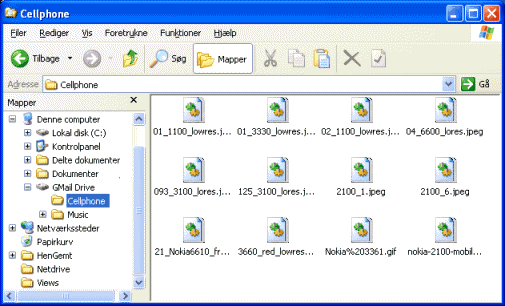
GMail Drive is a Shell Namespace Extension that creates a virtual filesystem around your Google Mail account, allowing you to use Gmail as a storage medium.
GMail Drive creates a virtual filesystem on top of your Google Gmail account and enables you to save and retrieve files stored on your Gmail account directly from inside Windows Explorer. GMail Drive literally adds a new drive to your computer under the My Computer folder, where you can create new folders, copy and drag'n'drop files to.
Ever since Google started to offer users a Gmail e-mail account, which includes storage space of 4000 megabytes, you have had plenty of storage space but not a lot to fill it up with. With GMail Drive you can easily copy files to your Google Mail account and retrieve them again. When you create a new file using GMail Drive, it generates an e-mail and posts it to your account. The e-mail appears in your normal Inbox folder, and the file is attached as an e-mail attachment. GMail Drive periodically checks your mail account (using the Gmail search function) to see if new files have arrived and to rebuild the directory structures. But basically GMail Drive acts as any other hard-drive installed on your computer. You can copy files to and from the GMail Drive folder simply by using drag'n'drop like you're used to with the normal Explorer folders.
Because the Gmail files will clutter up your Inbox folder, you may wish to create a filter in Gmail to automatically move the files (prefixed with the GMAILFS letters in the subject) to your archived mail folder.
Please note that GMail Drive is still an experimental tool. There's still a number of limitations of the file-system (such as total filename size must be less than 65 characters). Since the tool hooks up with the free Gmail Service provided by Google, changes in the Gmail system may break the tool's ability to function. I cannot guarantee that files stored in this manner will be accessible in the future.

Download this software here: http://www.megaupload.com/?d=CU21IBL1

Read more ...